LNX-034 kết thúc với một lời khuyên: việc phải chạy mãi thì đừng để trong nohup hay tmux của ai đó. bao-gia là một việc như thế: phải chạy 24/7, tự khởi động khi server bật lại, tự đứng dậy khi chết, và có log ở một chỗ. Trên Ubuntu, người làm việc đó là systemd. Trước khi viết dịch vụ cho bao-gia (LNX-036), An học cách đọc những dịch vụ đang có.
Đọc trước: LNX-031, LNX-032. Trạng thái đầu bài: npm run setup -- 35. Server lab chạy systemd làm PID 1 như một server thật; vài dòng (đường dẫn CGroup có chữ /docker/…) là dấu vết của việc lab chạy trong container.
1. systemd và unit
systemd là tiến trình đầu tiên kernel chạy (PID 1). Nó khởi động mọi thứ khác theo đúng thứ tự, giữ chúng chạy, ghi log của chúng vào journal (LNX-037), và dừng chúng khi tắt máy. Mỗi thứ systemd quản lý là một unit, mô tả bằng một file văn bản:
| Loại unit | Đuôi | Ví dụ |
|---|---|---|
| Dịch vụ | .service | ssh.service, cron.service, bao-gia.service |
| Hẹn giờ | .timer | logrotate.timer (LNX-038) |
| Nhóm mục tiêu | .target | multi-user.target: «máy đã lên, sẵn sàng cho người dùng» |
| Khác | .socket, .mount, .path |
systemctl là lệnh để nói chuyện với systemd.
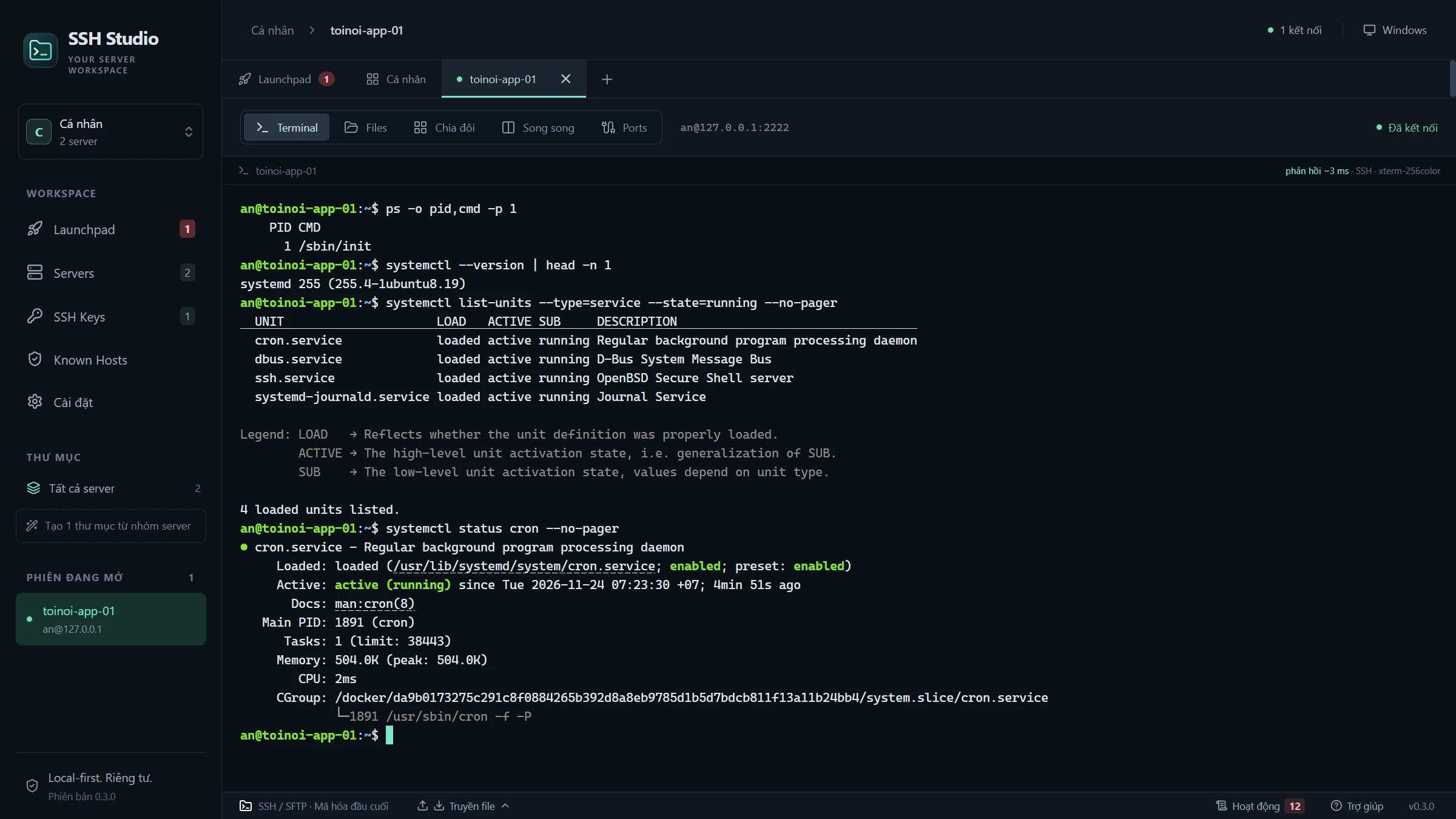
an@toinoi-app-01:~$ ps -o pid,cmd -p 1
    PID CMD
      1 /sbin/init
an@toinoi-app-01:~$ systemctl --version | head -n 1
systemd 255 (255.4-1ubuntu8.19)
an@toinoi-app-01:~$ systemctl list-units --type=service --state=running --no-pager
  UNIT                     LOAD   ACTIVE SUB     DESCRIPTION
  cron.service             loaded active running Regular background program processing daemon
  dbus.service             loaded active running D-Bus System Message Bus
  ssh.service              loaded active running OpenBSD Secure Shell server
  systemd-journald.service loaded active running Journal Service

Legend: LOAD   → Reflects whether the unit definition was properly loaded.
        ACTIVE → The high-level unit activation state, i.e. generalization of SUB.
        SUB    → The low-level unit activation state, values depend on unit type.

4 loaded units listed.
Server lab tối giản nên chỉ có bốn dịch vụ đang chạy; một máy ảo Ubuntu thường có vài chục.
2. Đọc systemctl status
an@toinoi-app-01:~$ systemctl status cron --no-pager
● cron.service - Regular background program processing daemon
     Loaded: loaded (/usr/lib/systemd/system/cron.service; enabled; preset: enabled)
     Active: active (running) since Tue 2026-11-24 07:04:57 +07; 48s ago
       Docs: man:cron(8)
   Main PID: 1891 (cron)
      Tasks: 1 (limit: 38443)
     Memory: 504.0K (peak: 504.0K)
        CPU: 2ms
     CGroup: /docker/c228c6fe829bbbdc35e4a059586331a9c9b70f195c352c923da91dbfae3fb840/system.slice/cron.service
             └─1891 /usr/sbin/cron -f -P
| Dòng | Đọc thế nào |
|---|---|
● xanh / ○ / × đỏ | Đang chạy / không chạy / lỗi |
Loaded: … cron.service; enabled; preset: enabled | File unit ở đâu; enabled: tự chạy khi boot |
Active: active (running) since …; 41s ago | Trạng thái và từ lúc nào |
Main PID | Tiến trình chính systemd đang trông |
Tasks, Memory, CPU | Tài nguyên cả nhóm tiến trình của dịch vụ đã dùng |
CGroup | Cây tiến trình của dịch vụ |
| Mấy dòng cuối | Log gần nhất từ journal (nếu bạn có quyền đọc, xem mục 5) |
cgroup là cơ chế của kernel gom các tiến trình của một dịch vụ vào một nhóm: systemd biết chính xác tiến trình nào thuộc dịch vụ nào (kể cả tiến trình con, cháu), giới hạn tài nguyên theo nhóm, và dừng được cả nhóm.
systemctl status3. Hỏi nhanh, xem file unit
an@toinoi-app-01:~$ systemctl is-active cron ssh
active
active
an@toinoi-app-01:~$ systemctl is-enabled cron ssh
enabled
enabled
an@toinoi-app-01:~$ systemctl show cron --no-pager -p MainPID -p ActiveState -p SubState -p Restart -p NRestarts
Restart=on-failure
MainPID=1891
NRestarts=0
ActiveState=active
SubState=running
an@toinoi-app-01:~$ systemctl cat cron --no-pager
[Unit]
Description=Regular background program processing daemon
Documentation=man:cron(8)
After=remote-fs.target nss-user-lookup.target

[Service]
EnvironmentFile=-/etc/default/cron
ExecStart=/usr/sbin/cron -f -P $EXTRA_OPTS
IgnoreSIGPIPE=false
KillMode=process
Restart=on-failure
SyslogFacility=cron

[Install]
WantedBy=multi-user.target
is-active,is-enabled: in một từ, mã thoát 0 nếu đúng. Hợp cho script:systemctl is-active --quiet bao-gia || báo động.systemctl show -p THUỘC_TÍNH: đọc từng thuộc tính chính xác, không phải đoán từstatus.NRestartslà số lần systemd tự khởi động lại dịch vụ.systemctl cat: nội dung file unit đang được dùng, kèm đường dẫn ở dòng đầu. File của gói nằm ở/usr/lib/systemd/system/; file bạn viết đặt ở/etc/systemd/system/(ưu tiên hơn).
File unit của cron cho thấy cấu trúc mọi unit dịch vụ: [Unit] (mô tả, thứ tự), [Service] (chạy gì, Restart=on-failure), [Install] (WantedBy=multi-user.target: được bật cùng nhóm mục tiêu nào).
4. start/stop khác enable/disable
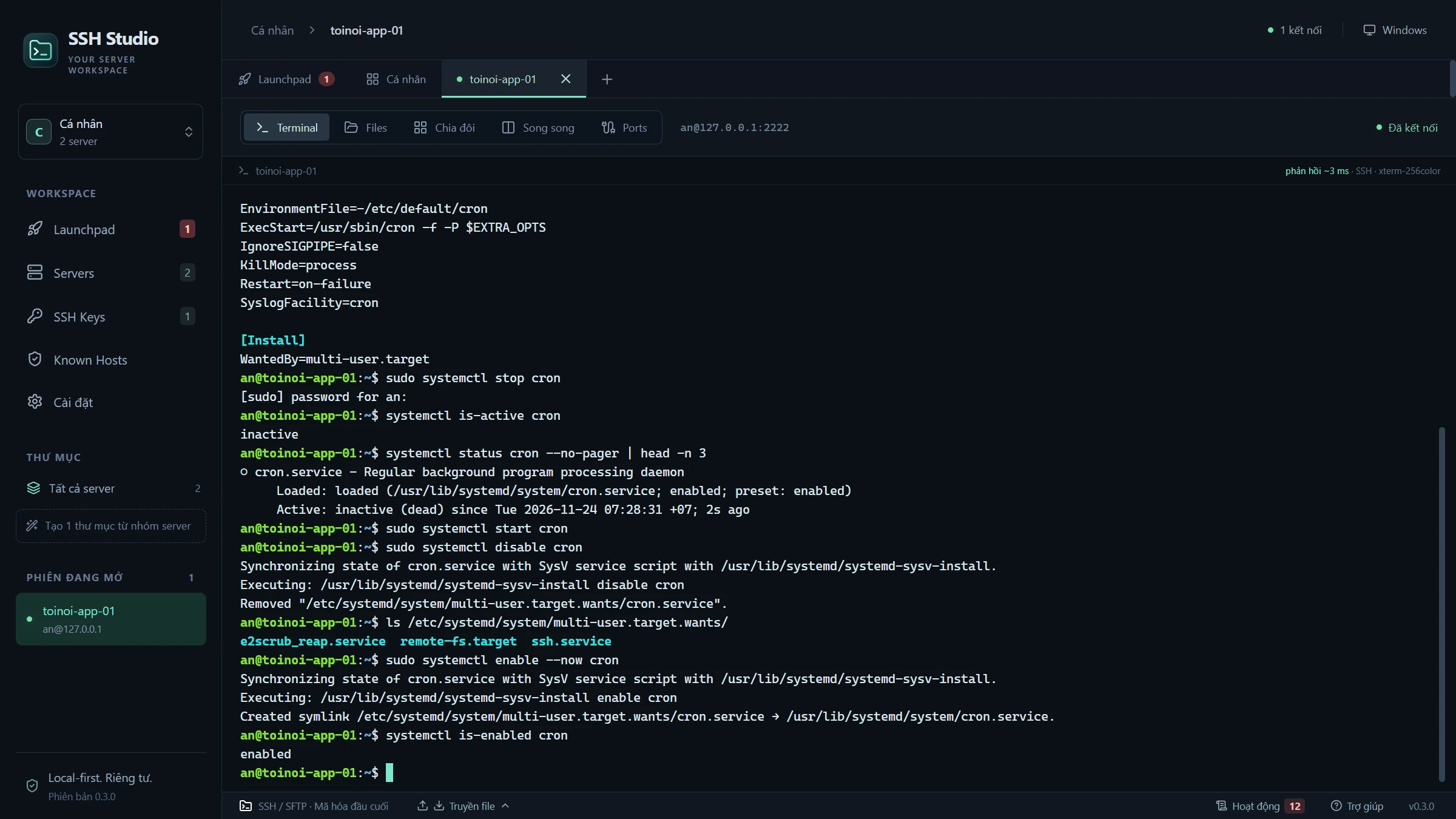
an@toinoi-app-01:~$ sudo systemctl stop cron
an@toinoi-app-01:~$ systemctl is-active cron
inactive
an@toinoi-app-01:~$ systemctl status cron --no-pager | head -n 3
○ cron.service - Regular background program processing daemon
     Loaded: loaded (/usr/lib/systemd/system/cron.service; enabled; preset: enabled)
     Active: inactive (dead) since Tue 2026-11-24 07:05:46 +07; 11ms ago
an@toinoi-app-01:~$ sudo systemctl start cron
an@toinoi-app-01:~$ sudo systemctl disable cron
Synchronizing state of cron.service with SysV service script with /usr/lib/systemd/systemd-sysv-install.
Executing: /usr/lib/systemd/systemd-sysv-install disable cron
Removed "/etc/systemd/system/multi-user.target.wants/cron.service".
an@toinoi-app-01:~$ ls /etc/systemd/system/multi-user.target.wants/
e2scrub_reap.service  remote-fs.target  ssh.service
an@toinoi-app-01:~$ sudo systemctl enable --now cron
Synchronizing state of cron.service with SysV service script with /usr/lib/systemd/systemd-sysv-install.
Executing: /usr/lib/systemd/systemd-sysv-install enable cron
Created symlink /etc/systemd/system/multi-user.target.wants/cron.service → /usr/lib/systemd/system/cron.service.
an@toinoi-app-01:~$ systemctl is-enabled cron
enabled
| Lệnh | Ảnh hưởng | Khi nào |
|---|---|---|
start / stop / restart | Bây giờ | Chạy, dừng, khởi động lại ngay |
enable / disable | Lần boot sau | Có tự chạy khi server khởi động không |
enable --now | Cả hai | Bật lúc boot và chạy ngay |
enable không có gì bí ẩn: nó tạo một symlink trong /etc/systemd/system/multi-user.target.wants/ trỏ tới file unit. Khi máy lên tới multi-user.target, systemd khởi động mọi unit trong thư mục .wants đó. disable xoá symlink. Dòng Synchronizing state … SysV là vì cron còn có script khởi động kiểu cũ trong /etc/init.d; systemd giữ hai bên khớp nhau.
stop gửi SIGTERM cho tiến trình chính, đợi, rồi mới SIGKILL (LNX-032). Vì cron có Restart=on-failure, nếu bạn kill -9 nó thay vì systemctl stop, systemd sẽ khởi động lại ngay: dịch vụ systemd thì dừng bằng systemctl.
start/stop và enable/disable5. Phụ thuộc, lỗi, và quyền đọc journal
an@toinoi-app-01:~$ systemctl list-dependencies ssh --no-pager | head -n 8
ssh.service
● ├─system.slice
● └─sysinit.target
●   ├─dev-hugepages.mount
●   ├─dev-mqueue.mount
○   ├─kmod-static-nodes.service
●   ├─ldconfig.service
○   ├─proc-sys-fs-binfmt_misc.automount
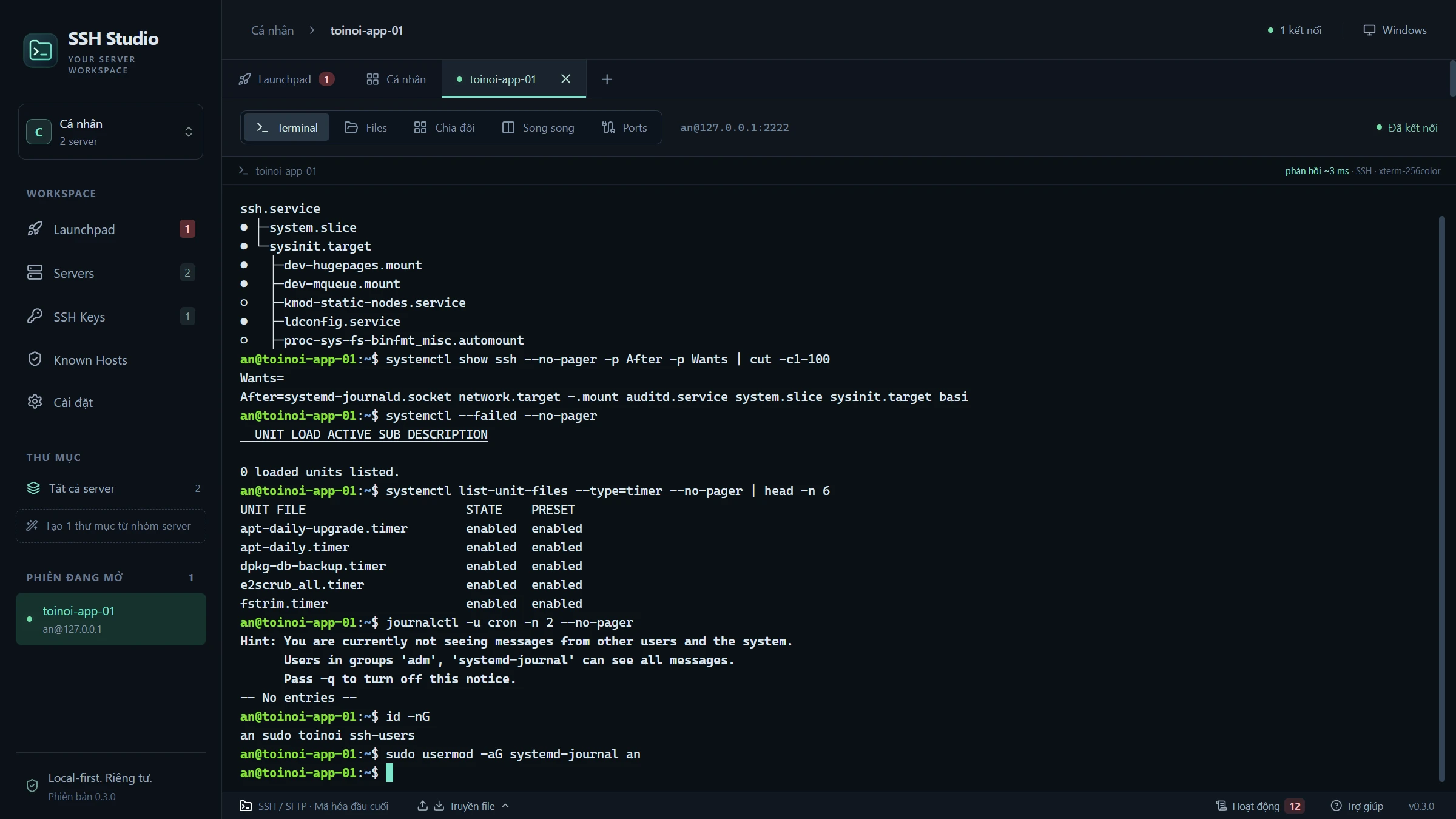
an@toinoi-app-01:~$ systemctl show ssh --no-pager -p After -p Wants | cut -c1-100
Wants=
After=basic.target systemd-journald.socket auditd.service sysinit.target network.target -.mount syst
an@toinoi-app-01:~$ systemctl --failed --no-pager
  UNIT LOAD ACTIVE SUB DESCRIPTION

0 loaded units listed.
an@toinoi-app-01:~$ systemctl list-unit-files --type=timer --no-pager | head -n 6
UNIT FILE                      STATE    PRESET
apt-daily-upgrade.timer        enabled  enabled
apt-daily.timer                enabled  enabled
dpkg-db-backup.timer           enabled  enabled
e2scrub_all.timer              enabled  enabled
fstrim.timer                   enabled  enabled

an@toinoi-app-01:~$ journalctl -u cron -n 2 --no-pager
Hint: You are currently not seeing messages from other users and the system.
      Users in groups 'adm', 'systemd-journal' can see all messages.
      Pass -q to turn off this notice.
-- No entries --
an@toinoi-app-01:~$ id -nG
an sudo toinoi ssh-users
an@toinoi-app-01:~$ sudo usermod -aG systemd-journal an
list-dependenciesvẽ cây những gì một unit cần (Wants=,Requires=).After=chỉ là thứ tự (khởi động sau), không kéo theo; muốn «cần và sau», unit ghi cả hai.systemctl --failed: các unit đang lỗi. Câu lệnh đầu tiên nên chạy khi đăng nhập vào một server có vấn đề.list-unit-files --type=timer: các timer cài sẵn của Ubuntu, sẽ gặp lại ở LNX-038.journalctltrả về rỗng với dòngHint: người dùng thường chỉ đọc được log của chính mình. Log hệ thống dành cho nhómsystemd-journal(hoặcadm). An thêm mình vào nhóm; như mọi thay đổi nhóm (LNX-007), nó có hiệu lực từ lần đăng nhập sau. Bài tiếp theo bắt đầu bằng một phiên mới.
6. Đối chiếu thao tác
| Việc | Lệnh |
|---|---|
| Dịch vụ đang chạy | systemctl list-units --type=service --state=running |
| Trạng thái chi tiết | systemctl status TÊN |
| Câu trả lời một từ (cho script) | systemctl is-active, is-enabled |
| Một thuộc tính | systemctl show TÊN -p MainPID |
| Nội dung file unit | systemctl cat TÊN |
| Chạy / dừng / khởi động lại | sudo systemctl start, stop, restart |
| Bật / tắt lúc boot | sudo systemctl enable, disable (--now để làm luôn) |
| Unit lỗi | systemctl --failed |
7. Lỗi thường gặp
enable rồi tưởng dịch vụ đã chạy. enable chỉ là cho lần boot sau. Dùng enable --now, hoặc start thêm.
Sửa file unit mà không daemon-reload. systemd vẫn dùng bản cũ đã nạp; status sẽ cảnh báo «changed on disk».
Dừng dịch vụ bằng kill. Với Restart=, nó chạy lại ngay; trạng thái và log rối.
Đọc Active: active (exited) thành «đang chạy». Với dịch vụ chạy một lần (Type=oneshot), nghĩa là đã chạy xong và thành công; không có tiến trình nào đang sống.
journalctl không thấy gì. Thiếu nhóm systemd-journal/adm, hoặc dùng sudo journalctl.
Bài tập
systemctl list-units --type=target --no-pager.multi-user.targetvàgraphical.targetkhác nhau gì? Server của bạn mặc định đi tới đâu (systemctl get-default)?systemctl show ssh -p Restart -p KillMode -p TimeoutStopUSec. Dừngsshthì các phiên SSH đang mở có bị cắt không? (Gợi ý:KillMode.)systemctl list-dependencies --reverse cron: ai cầncron?- Đặt
systemctl mask cronrồi thửstart. Thông báo gì?unmasklại.maskkhácdisablethế nào?
Đọc tiếp
LNX-036 · Viết unit systemd cho bao-gia: đưa bản 1.5.0 vào systemd, chạy bằng tài khoản dịch vụ, tự khởi động lại khi chết.
Bình luận (…)