Thư mục shared/logs của bao-gia có báo cáo mỗi ngày từ script hang-ngay (LNX-020), và chẳng ai xoá. Bình muốn mỗi đêm có một việc dọn các báo cáo cũ hơn 14 ngày. An đã biết cron. Nhưng server vừa khởi động lại hôm thứ Bảy đúng lúc 01:17, và việc hang-ngay của đêm đó không bao giờ chạy, mà cũng không ai biết. Bài này viết việc dọn dẹp bằng systemd timer, và giải thích vì sao lần này An không chọn cron.
Đọc trước: LNX-020 (cron), LNX-036, LNX-037. Trạng thái đầu bài: npm run setup -- 38. Ngày giờ trong bài là ngày lab chạy; số file bị dọn tuỳ ngày bạn làm theo.
1. Lịch đang có
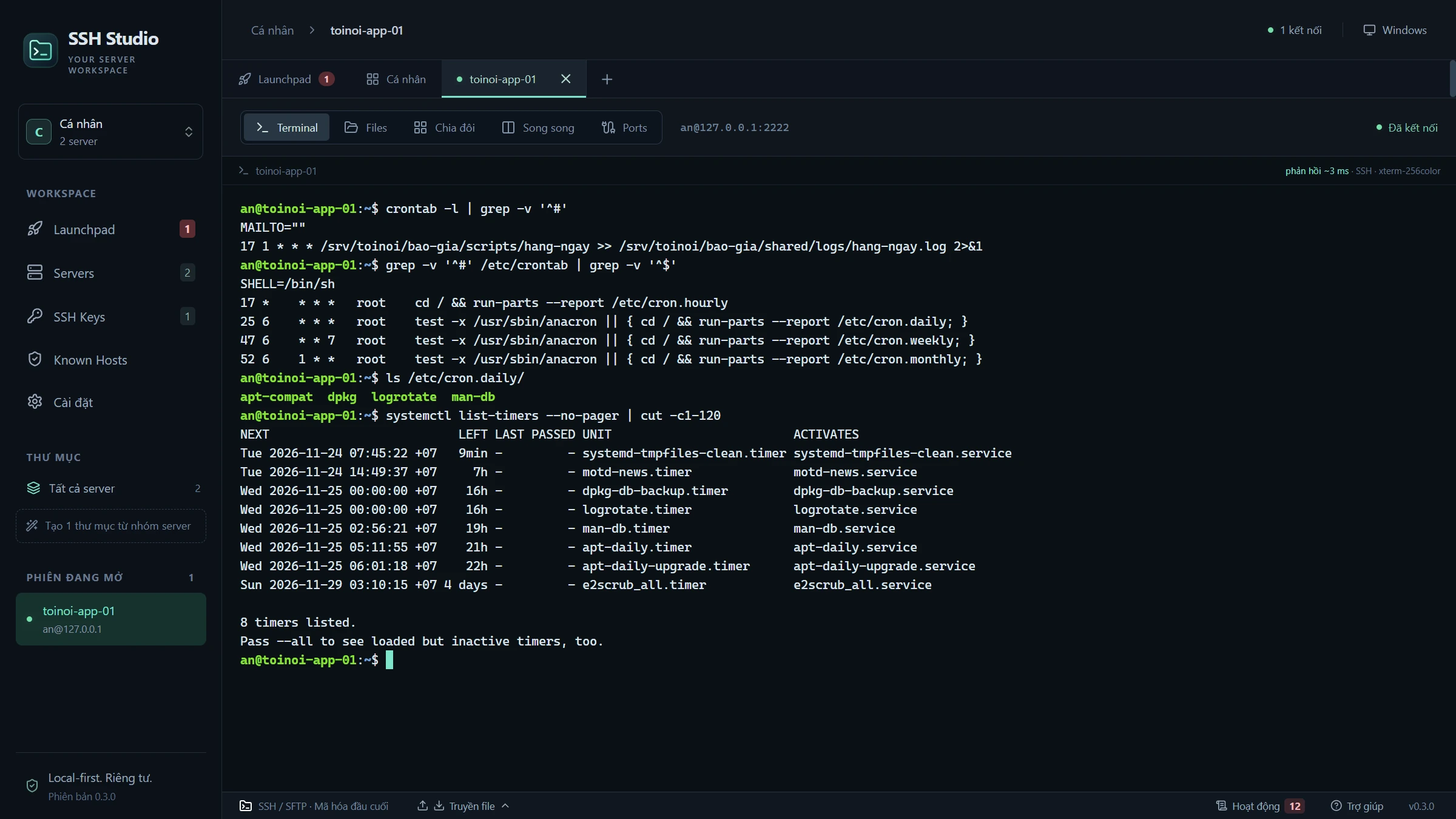
an@toinoi-app-01:~$ crontab -l | grep -v '^#'
MAILTO=""
17 1 * * * /srv/toinoi/bao-gia/scripts/hang-ngay >> /srv/toinoi/bao-gia/shared/logs/hang-ngay.log 2>&1
an@toinoi-app-01:~$ grep -v '^#' /etc/crontab | grep -v '^$'
SHELL=/bin/sh
17 *    * * *   root    cd / && run-parts --report /etc/cron.hourly
25 6    * * *   root    test -x /usr/sbin/anacron || { cd / && run-parts --report /etc/cron.daily; }
47 6    * * 7   root    test -x /usr/sbin/anacron || { cd / && run-parts --report /etc/cron.weekly; }
52 6    1 * *   root    test -x /usr/sbin/anacron || { cd / && run-parts --report /etc/cron.monthly; }
an@toinoi-app-01:~$ ls /etc/cron.daily/
apt-compat  dpkg  logrotate  man-db

an@toinoi-app-01:~$ systemctl list-timers --no-pager | cut -c1-120
NEXT                          LEFT LAST PASSED UNIT                         ACTIVATES
Tue 2026-11-24 07:18:34 +07  12min -         - systemd-tmpfiles-clean.timer systemd-tmpfiles-clean.service
Tue 2026-11-24 17:10:47 +07    10h -         - motd-news.timer              motd-news.service
Tue 2026-11-24 21:11:20 +07    14h -         - apt-daily.timer              apt-daily.service
Wed 2026-11-25 00:00:00 +07    16h -         - dpkg-db-backup.timer         dpkg-db-backup.service
Wed 2026-11-25 00:00:00 +07    16h -         - logrotate.timer              logrotate.service
Wed 2026-11-25 06:28:10 +07    23h -         - apt-daily-upgrade.timer      apt-daily-upgrade.service
Wed 2026-11-25 07:40:38 +07    24h -         - man-db.timer                 man-db.service
Sun 2026-11-29 03:10:18 +07 4 days -         - e2scrub_all.timer            e2scrub_all.service

8 timers listed.
Pass --all to see loaded but inactive timers, too.
- Cron có ba chỗ: crontab của từng người dùng (
crontab -l, việchang-ngaycủa An),/etc/crontabvà/etc/cron.d/(của hệ thống, có thêm cột người dùng), và các thư mục/etc/cron.daily,weekly,monthly(script đặt vào là chạy theo chu kỳ). - Dòng
test -x /usr/sbin/anacron || …trong/etc/crontab: nếu cóanacron, việc hằng ngày do nó lo (nó biết bù việc bị lỡ); không có thì cron tự chạy lúc 06:25. - systemd timer:
list-timerscho biết mỗi timer chạy lần tới lúc nào (NEXT,LEFT), lần trước lúc nào (LAST,PASSED), và kích hoạt unit nào. Ubuntu dùng timer cho nhiều việc bảo trì:logrotate,apt-daily,man-db… Trong/etc/cron.dailyvẫn cólogrotate, nhưng script đó tự bỏ qua khi máy chạy systemd: timer đã làm thay.
2. Một việc mới: service + timer
Timer luôn đi thành cặp: một unit .service mô tả việc gì, một unit .timer cùng tên mô tả lúc nào. Trước hết, An tạo vài báo cáo «cũ» để có thứ mà dọn:
an@toinoi-app-01:~$ cd /srv/toinoi/bao-gia/shared/logs
an@toinoi-app-01:/srv/toinoi/bao-gia/shared/logs$ touch -d '2026-10-30 01:17' bao-cao-2026-10-30.txt
an@toinoi-app-01:/srv/toinoi/bao-gia/shared/logs$ touch -d '2026-11-05 01:17' bao-cao-2026-11-05.txt
an@toinoi-app-01:/srv/toinoi/bao-gia/shared/logs$ touch -d '2026-11-15 01:17' bao-cao-2026-11-15.txt
an@toinoi-app-01:/srv/toinoi/bao-gia/shared/logs$ ls -l --time-style=+%F bao-cao-*.txt
-rw-rw-r-- 1 an toinoi   0 2026-10-30 bao-cao-2026-10-30.txt
-rw-rw-r-- 1 an toinoi   0 2026-11-05 bao-cao-2026-11-05.txt
-rw-rw-r-- 1 an toinoi   0 2026-11-15 bao-cao-2026-11-15.txt
-rw-rw-r-- 1 an an     413 2026-11-24 bao-cao-2026-11-21.txt
-rw-rw-r-- 1 an an     413 2026-11-24 bao-cao-2026-11-24.txt
Service, chạy một lần rồi thoát:
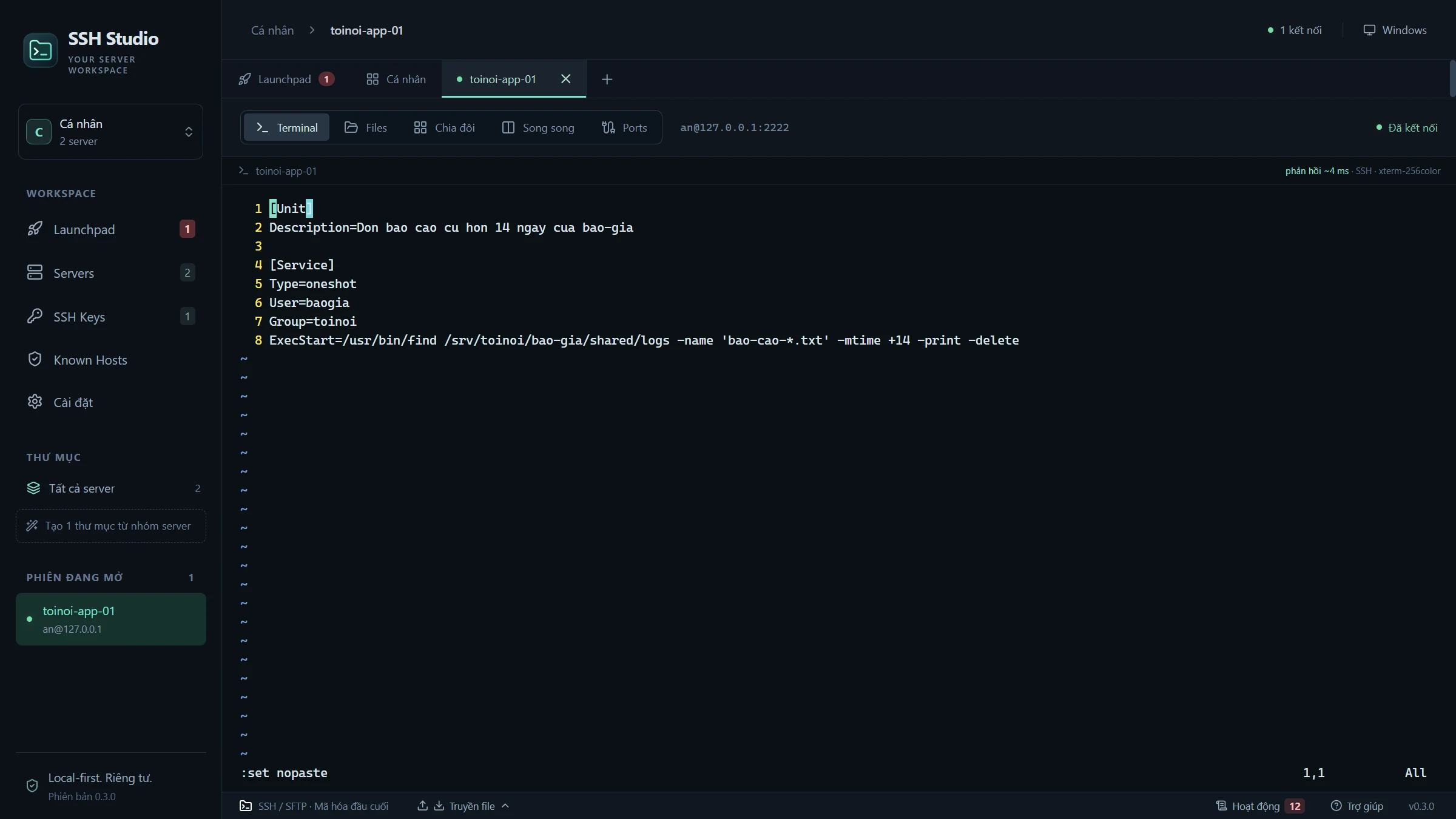
[Unit]
Description=Don bao cao cu hon 14 ngay cua bao-gia

[Service]
Type=oneshot
User=baogia
Group=toinoi
ExecStart=/usr/bin/find /srv/toinoi/bao-gia/shared/logs -name 'bao-cao-*.txt' -mtime +14 -print -delete
Type=oneshot: việc chạy xong là xong, không có tiến trình sống mãi.- Chạy bằng
baogia: thư mục log thuộc nhómtoinoivà có quyền ghi cho nhóm, nênbaogiaxoá được báo cáo mà không cầnroot. find -mtime +14 -print -delete(LNX-009): sửa đổi lần cuối hơn 14 ngày trước, in tên rồi xoá. Tên in ra đi vào journal: bằng chứng việc đã làm gì.- Không có mục
[Install]: service này không bao giờ tự chạy, chỉ timer gọi nó.
Timer:
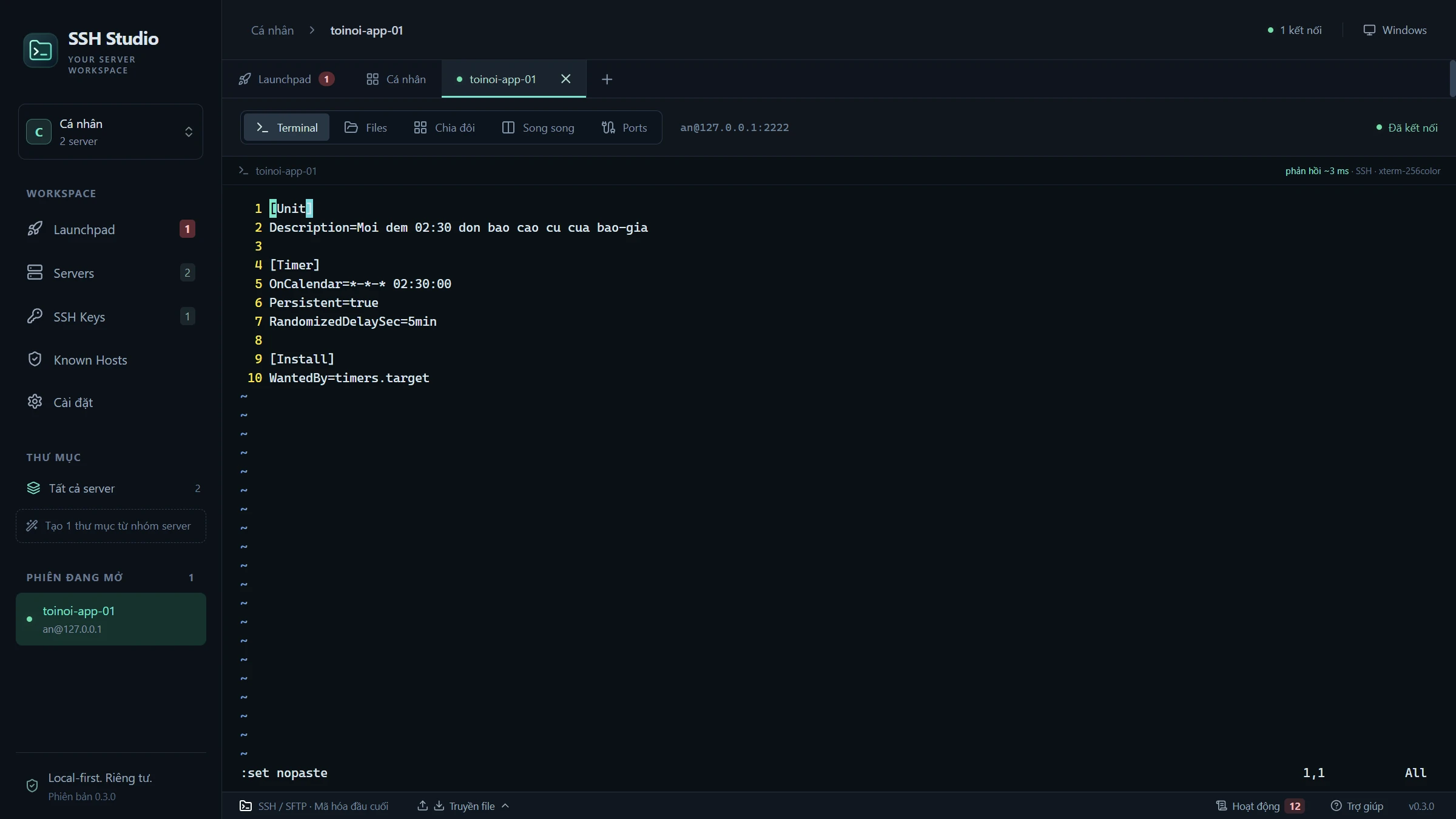
[Unit]
Description=Moi dem 02:30 don bao cao cu cua bao-gia

[Timer]
OnCalendar=*-*-* 02:30:00
Persistent=true
RandomizedDelaySec=5min

[Install]
WantedBy=timers.target
| Dòng | Ý nghĩa |
|---|---|
OnCalendar=*-*-* 02:30:00 | Năm-tháng-ngày giờ:phút:giây, * là mọi giá trị. Viết tắt: daily, weekly, Mon *-*-* 09:00 |
Persistent=true | Nhớ lần chạy cuối vào đĩa; nếu lúc 02:30 server đang tắt, chạy bù ngay khi bật lại |
RandomizedDelaySec=5min | Lùi ngẫu nhiên tới 5 phút, để nhiều server (hay nhiều việc) không cùng chạy đúng một giây |
WantedBy=timers.target | enable gắn timer vào lúc boot |
an@toinoi-app-01:~$ systemd-analyze calendar '*-*-* 02:30:00' | head -n 3
Normalized form: *-*-* 02:30:00
    Next elapse: Wed 2026-11-25 02:30:00 +07
       (in UTC): Tue 2026-11-24 19:30:00 UTC
an@toinoi-app-01:~$ sudo systemd-analyze verify /etc/systemd/system/bao-gia-don-bao-cao.service /etc/systemd/system/bao-gia-don-bao-cao.timer
an@toinoi-app-01:~$ sudo systemctl daemon-reload
an@toinoi-app-01:~$ sudo systemctl enable --now bao-gia-don-bao-cao.timer
Created symlink /etc/systemd/system/timers.target.wants/bao-gia-don-bao-cao.timer → /etc/systemd/system/bao-gia-don-bao-cao.timer.
an@toinoi-app-01:~$ systemctl list-timers bao-gia-don-bao-cao.timer --no-pager | cut -c1-120
NEXT                        LEFT LAST PASSED UNIT                      ACTIVATES
Wed 2026-11-25 02:31:57 +07  19h -         - bao-gia-don-bao-cao.timer bao-gia-don-bao-cao.service

1 timers listed.
Pass --all to see loaded but inactive timers, too.
systemd-analyze calendardịch một biểu thức lịch và cho biết lần chạy tới: cách nhanh nhất để không viết sai lịch.systemd-analyze verifykiểm tra file unit; không in gì là ổn.enable --nowcho timer (không phải service).NEXTlà 02:31:57 chứ không phải 02:30: đó làRandomizedDelaySec.
3. Chạy thử ngay
Không cần đợi tới 02:30: chạy thẳng service.
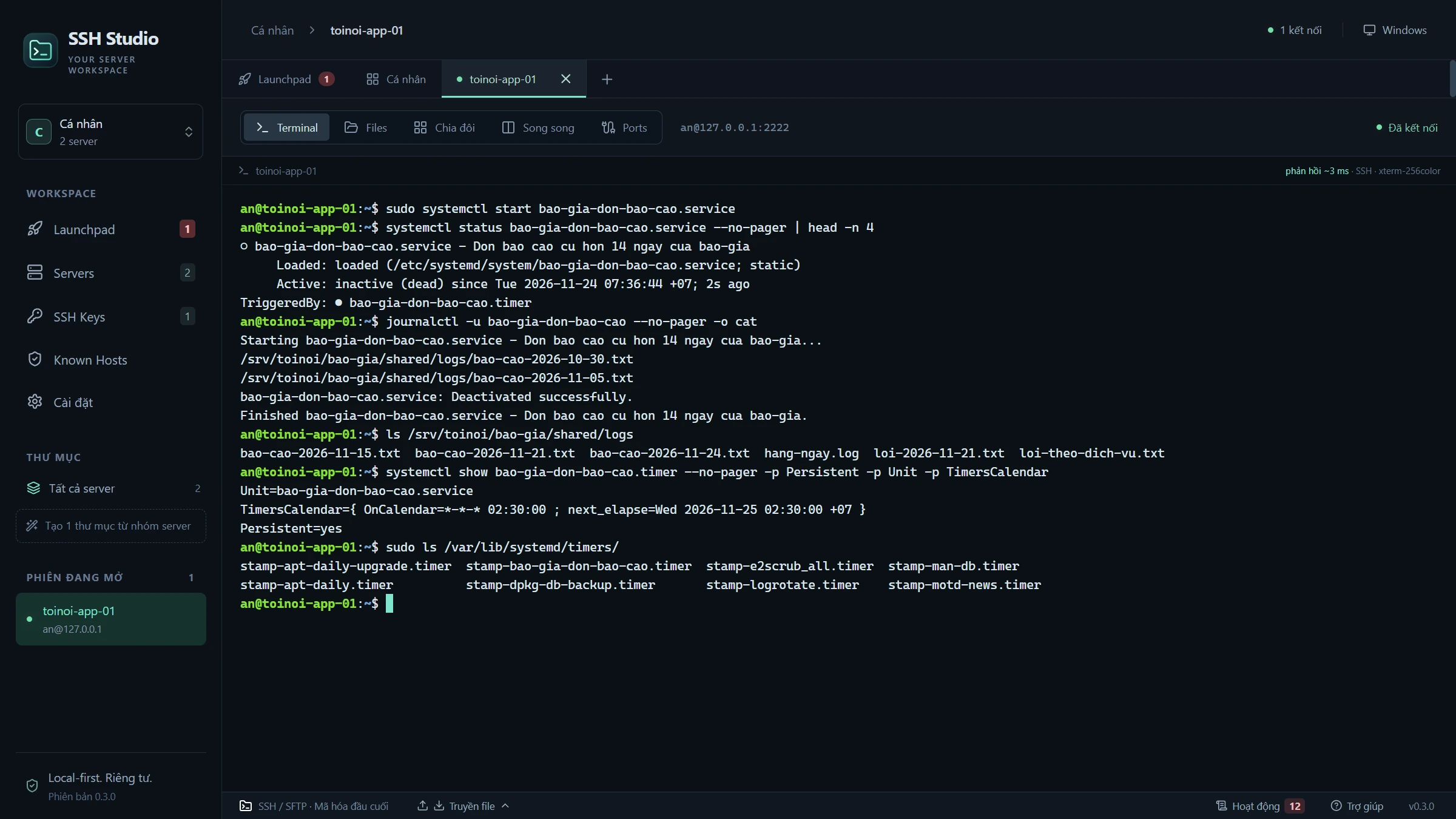
an@toinoi-app-01:~$ sudo systemctl start bao-gia-don-bao-cao.service
an@toinoi-app-01:~$ systemctl status bao-gia-don-bao-cao.service --no-pager | head -n 4
○ bao-gia-don-bao-cao.service - Don bao cao cu hon 14 ngay cua bao-gia
     Loaded: loaded (/etc/systemd/system/bao-gia-don-bao-cao.service; static)
     Active: inactive (dead) since Tue 2026-11-24 07:06:00 +07; 6ms ago
TriggeredBy: ● bao-gia-don-bao-cao.timer
an@toinoi-app-01:~$ journalctl -u bao-gia-don-bao-cao --no-pager -o cat
Starting bao-gia-don-bao-cao.service - Don bao cao cu hon 14 ngay cua bao-gia...
/srv/toinoi/bao-gia/shared/logs/bao-cao-2026-10-30.txt
/srv/toinoi/bao-gia/shared/logs/bao-cao-2026-11-05.txt
bao-gia-don-bao-cao.service: Deactivated successfully.
Finished bao-gia-don-bao-cao.service - Don bao cao cu hon 14 ngay cua bao-gia.
an@toinoi-app-01:~$ ls /srv/toinoi/bao-gia/shared/logs
bao-cao-2026-11-15.txt  bao-cao-2026-11-24.txt  loi-2026-11-21.txt
bao-cao-2026-11-21.txt  hang-ngay.log           loi-theo-dich-vu.txt

an@toinoi-app-01:~$ systemctl show bao-gia-don-bao-cao.timer --no-pager -p Persistent -p Unit -p TimersCalendar
Unit=bao-gia-don-bao-cao.service
TimersCalendar={ OnCalendar=*-*-* 02:30:00 ; next_elapse=Wed 2026-11-25 02:30:00 +07 }
Persistent=yes
an@toinoi-app-01:~$ sudo ls /var/lib/systemd/timers/
stamp-apt-daily-upgrade.timer    stamp-dpkg-db-backup.timer  stamp-man-db.timer
stamp-apt-daily.timer            stamp-e2scrub_all.timer     stamp-motd-news.timer
stamp-bao-gia-don-bao-cao.timer  stamp-logrotate.timer
systemctl startvớiType=oneshotđợi việc chạy xong rồi mới trả dấu nhắc.statuslàinactive (dead), kết quả thành công;TriggeredBycho biết timer nào gọi nó.- Journal ghi lại tên hai báo cáo đã xoá (30/10 và 05/11, hơn 14 ngày). Báo cáo 15/11 còn, vì chưa đủ 14 ngày.
Persistent=yeslưu mốc thời gian vào/var/lib/systemd/timers/stamp-TÊN.timer. Khi máy bật lại, systemd so mốc đó với lịch: lỡ lần nào thì chạy bù một lần.
4. Cron hay timer?
| cron | systemd timer | |
|---|---|---|
| Viết | Một dòng | Hai file |
| Server tắt đúng giờ chạy | Lỡ, không ai biết (trừ anacron với việc hằng ngày) | Persistent=true chạy bù |
| Log | Phải tự chuyển hướng ra file, MAILTO | Tự vào journal, journalctl -u |
| Biết lần chạy trước có lỗi không | Tự xem file log | systemctl status, --failed |
| Chạy thử bằng tay đúng môi trường | Khó (môi trường của cron khác shell, LNX-020) | systemctl start TÊN.service |
| Giới hạn tài nguyên, sandbox | Không | Mọi tuỳ chọn của [Service] (LNX-040) |
| Có ở mọi nơi | Gần như mọi Unix | Máy dùng systemd |
Cron vẫn tốt cho việc nhỏ của một người dùng (crontab -e, không cần sudo). Việc của dịch vụ, việc mà nhóm cần biết đã chạy hay chưa, thì timer an toàn hơn. An giữ hang-ngay trong cron (đã kiểm thử ở Phần 2) và ghi việc chuyển nó sang timer vào bài tập.
5. Đối chiếu thao tác
| Việc | Lệnh |
|---|---|
| Timer đang có | systemctl list-timers (--all gồm cả timer không hoạt động) |
| Kiểm biểu thức lịch | systemd-analyze calendar 'Mon..Fri 09:00' |
| Kiểm file unit | sudo systemd-analyze verify FILE… |
| Bật timer | sudo systemctl enable --now TÊN.timer |
| Chạy việc ngay | sudo systemctl start TÊN.service |
| Kết quả lần chạy | journalctl -u TÊN.service, systemctl status TÊN.service |
| Cron của mình | crontab -l, crontab -e |
6. Lỗi thường gặp
enable service thay vì timer. Service không có [Install] thì enable chỉ in cảnh báo «no installation config» và không làm gì; nếu có, nó chạy lúc boot chứ không theo lịch. Thứ cần enable là timer.
Viết OnCalendar=02:30 rồi tưởng chạy mỗi giờ 30. 02:30 là 02:30 mỗi ngày. Mỗi giờ phút 30 là *:30. Luôn kiểm bằng systemd-analyze calendar.
Quên Persistent=true. Timer cũng lỡ việc như cron nếu server tắt đúng giờ.
Việc dọn dẹp chạy bằng root cho tiện. Một lỗi trong biểu thức find có thể xoá lan sang thư mục khác. Chạy bằng người dùng chỉ có quyền đúng chỗ.
Dùng -mtime mà không thử. Chạy find … -print (không -delete) trước để xem danh sách.
Bài tập
- Viết
bao-gia-hang-ngay.servicevà.timerthay cho dòng cronhang-ngaycủa An (01:17 mỗi đêm,Persistent=true, chạy bằngan). Chạy thử bằngsystemctl start, rồi xoá dòng trong crontab. systemd-analyze calendar 'Mon..Fri *-*-* 08:00:00' 'quarterly'. Lần chạy tới là khi nào?- Dừng server lab (
npm run downrồiup… hoặcdocker restart toinoi-app-01) sau khi đổi giờ của timer sang một thời điểm vừa qua trong lúc server tắt. Timer có chạy bù không? - Thêm
OnBootSec=5minvào một timer. KhácOnCalendarthế nào?
Đọc tiếp
LNX-039 · logrotate và dọn log: file log yêu cầu của bao-gia lớn dần mỗi ngày; xoay vòng, nén, và báo cho dịch vụ mở file mới.
Bình luận (…)