Hàm định dạng "31.000 đ" đang được chép tay giữa dịch vụ báo giá và app tài xế, và hai bản đã lệch nhau (một bên "31,000đ"). Lan tách nó ra repository riêng tien-te. Dịch vụ báo giá cần dùng đúng một phiên bản của thư viện, cập nhật khi nhóm quyết định chứ không tự trôi theo. Đó là việc của submodule.
Đọc trước: GIT-021, GIT-008. Lab: npm run p05 -- 44; mở trạng thái đầu bài bằng GitStudio: npm run setup -- 44. Sau bài này, bạn thêm, cập nhật, khởi tạo, gỡ được submodule và hiểu repository chính ghi nhận gì về nó.
1. Submodule là gì
Một submodule là một repository Git khác nằm trong một thư mục của repository chính. Repository chính không lưu file của thư viện; nó lưu hai thứ:
.gitmodules: đường dẫn thư mục và URL của repository thư viện (file thường, commit cùng code).- Một con trỏ trong tree: tại đường dẫn
lib/tien-telà mã của đúng một commit của thư viện (mode160000, "gitlink").
Đổi phiên bản thư viện = đổi con trỏ = một commit trong repository chính. Mọi người checkout commit đó sẽ có đúng phiên bản thư viện đó.
2. Thêm submodule
git submodule add ../tien-te.git lib/tien-te
Cloning into '<lab>/work/bao-gia/lib/tien-te'...
fatal: transport 'file' not allowed
Từ Git 2.38, submodule từ đường dẫn cục bộ bị chặn mặc định (một lỗ hổng bảo mật cũ lợi dụng nó). Remote của lab là thư mục, nên cho phép riêng từng lệnh; với GitHub/GitLab (https, ssh) không gặp chuyện này:
git -c protocol.file.allow=always submodule add ../tien-te.git lib/tien-te
Get-Content .gitmodules
git diff --cached --submodule=short
[submodule "lib/tien-te"]
	path = lib/tien-te
	url = ../tien-te.git
diff --git a/lib/tien-te b/lib/tien-te
new file mode 160000
index 0000000..23f146f
--- /dev/null
+++ b/lib/tien-te
@@ -0,0 +1 @@
+Subproject commit 23f146fec27a6b526d573e9b3edab067fe614df7
URL tương đối ../tien-te.git được tính từ URL của origin của repository chính (…/remote/bao-gia.git → …/remote/tien-te.git). Ai clone qua https thì thư viện cũng đi qua https, ai dùng ssh thì đi qua ssh, và URL không chứa đường dẫn máy của ai. Trên GitHub, hai repository cùng tổ chức dùng đúng kiểu này.
git commit -q -m "Dùng thư viện tiền tệ chung qua submodule"
git submodule status
23f146fec27a6b526d573e9b3edab067fe614df7 lib/tien-te (heads/main)
Ký tự đầu dòng của submodule status: dấu cách = khớp commit được ghi nhận; - = chưa khởi tạo; + = đang checkout commit khác; U = xung đột.
3. Cập nhật lên phiên bản mới
Lan thêm dạng ngắn "31k" vào thư viện và push. Dịch vụ báo giá không tự nhận: con trỏ vẫn ở commit cũ. Minh cập nhật có chủ đích:
git -c protocol.file.allow=always submodule update --remote lib/tien-te
git diff --submodule=log
git commit -q -am "Cập nhật thư viện tiền tệ: dạng ngắn"
git push -q
Submodule path 'lib/tien-te': checked out '02ae86b4a66175d1b290923c36b48c74de3fd17a'
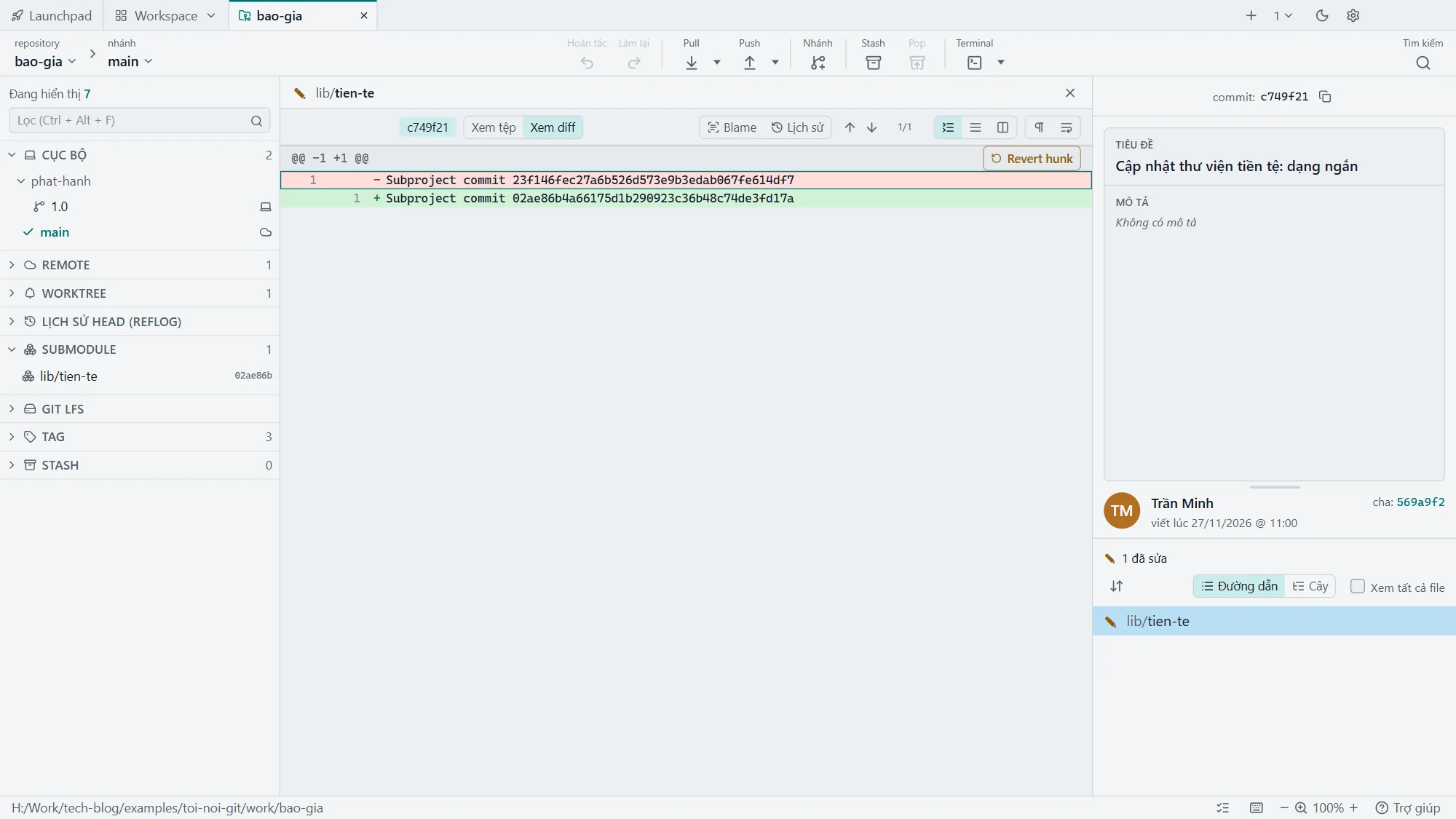
Submodule lib/tien-te 23f146f..02ae86b:
  > Thêm dạng ngắn 31k
--remote lấy commit mới nhất của nhánh mặc định trên remote của thư viện (đổi nhánh bằng git config -f .gitmodules submodule.lib/tien-te.branch phat-hanh). diff --submodule=log liệt kê các commit thư viện đã được kéo vào: đúng thứ người review cần đọc. Cách tương đương bằng tay: cd lib/tien-te, git pull, cd ../.., rồi commit con trỏ.
4. Phía người clone hoặc pull
git pull -q --ff-only upstream main
git submodule status
git -c protocol.file.allow=always submodule update --init
git submodule status
-02ae86b4a66175d1b290923c36b48c74de3fd17a lib/tien-te
Submodule 'lib/tien-te' (<lab>/work/remote/tien-te.git) registered for path 'lib/tien-te'
Cloning into '<lab>/work/lan/bao-gia/lib/tien-te'...
Submodule path 'lib/tien-te': checked out '02ae86b4a66175d1b290923c36b48c74de3fd17a'
 02ae86b4a66175d1b290923c36b48c74de3fd17a lib/tien-te (heads/main)
Pull chỉ mang về .gitmodules và con trỏ; thư mục lib/tien-te rỗng (dấu -). submodule update --init clone thư viện và checkout đúng commit được ghi nhận. Khi clone mới: git clone --recurse-submodules <url>. Để pull luôn cập nhật submodule: git config submodule.recurse true.
Bên trong submodule, HEAD thường detached (checkout một commit, không phải nhánh). Muốn sửa thư viện ngay tại đó: git switch main trong lib/tien-te trước khi commit, rồi push thư viện, rồi commit con trỏ ở repository chính.
5. Đổi URL, gỡ submodule
- Thư viện chuyển chỗ: sửa
urltrong.gitmodules, commit, rồi mỗi người chạygit submodule sync(chép URL mới vào.git/config) trướcupdate. - Tạm bỏ (không cần thư viện ở máy này):
git submodule deinit lib/tien-telàm trống thư mục;update --initđể lấy lại. - Gỡ hẳn:
git rm lib/tien-te(xoá con trỏ và mục trong.gitmodules), commit; xoá.git/modules/lib/tien-tenếu muốn dọn hết.
6. Trên GitStudio
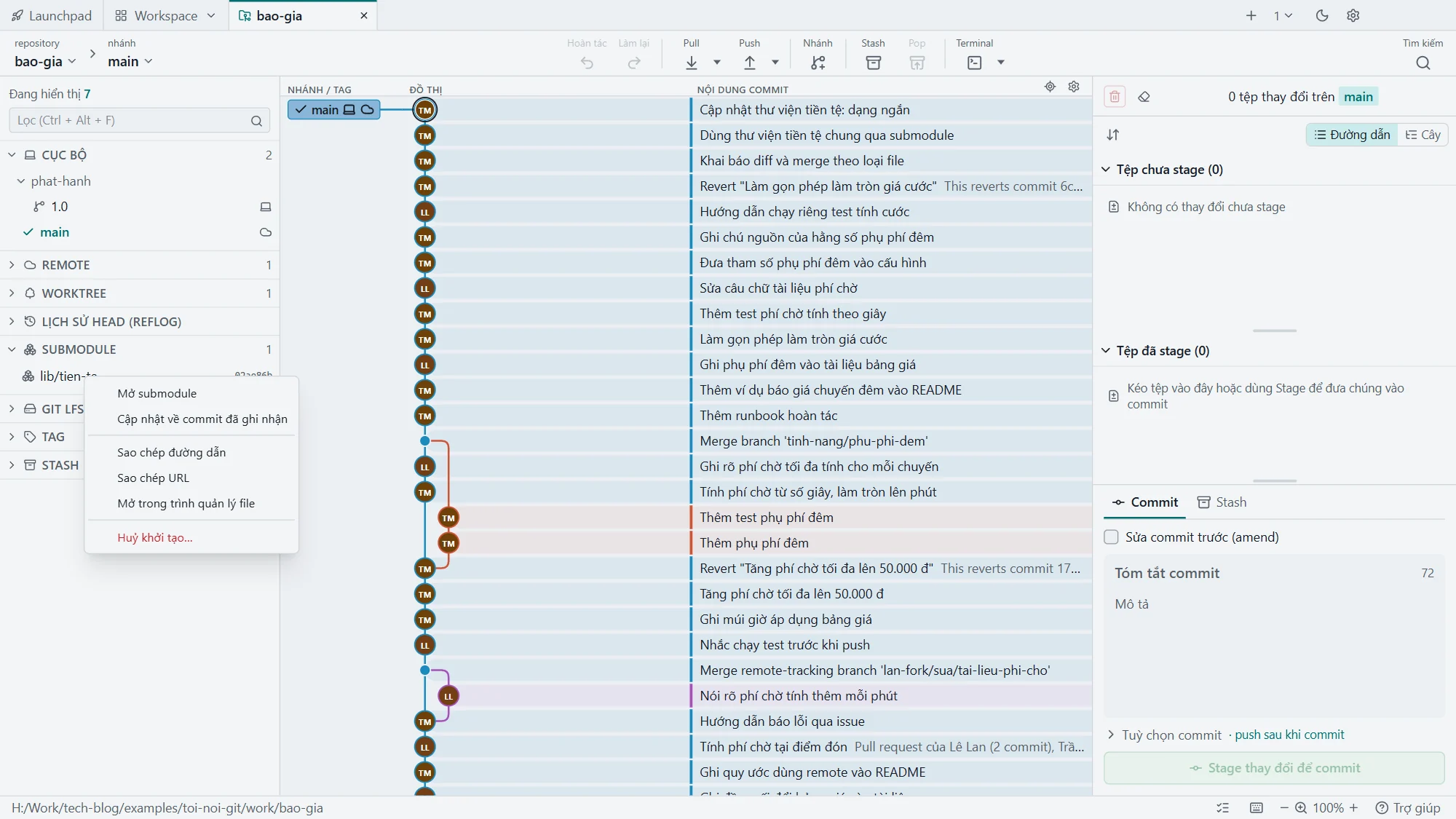
Thanh bên → mục Submodule liệt kê từng submodule kèm mã commit đang checkout; màu biểu tượng và tooltip (rê chuột) cho biết trạng thái Đã khớp, Chưa khởi tạo, Đang checkout commit khác commit đã ghi nhận hoặc Xung đột merge. Menu Thao tác submodule: Thêm submodule… (URL repository, Thư mục, Nhánh theo dõi), Cập nhật tất cả submodule, Đồng bộ URL từ .gitmodules. Chuột phải một submodule: Mở submodule (mở thành tab riêng), Cập nhật về commit đã ghi nhận (với submodule chưa khởi tạo, mục này thành Khởi tạo và cập nhật), Sao chép đường dẫn, Sao chép URL, Mở trong trình quản lý file, Huỷ khởi tạo…. Khi có submodule lệch, mục hiện Cập nhật N submodule chưa khớp.
Thay đổi con trỏ hiện trong panel thay đổi như một file; diff của nó là dòng Subproject commit.
7. Đối chiếu giao diện và lệnh
| Việc | GitStudio | Lệnh |
|---|---|---|
| Thêm | Submodule → Thêm submodule… | git submodule add <url> <thư mục> |
| Khởi tạo sau clone/pull | Khởi tạo và cập nhật | git submodule update --init |
| Về đúng commit đã ghi nhận | Cập nhật về commit đã ghi nhận | git submodule update |
| Lên phiên bản mới của thư viện | (terminal) rồi commit | git submodule update --remote |
| Đồng bộ URL | Đồng bộ URL từ .gitmodules | git submodule sync |
| Tạm bỏ | Huỷ khởi tạo… | git submodule deinit <thư mục> |
| Clone kèm submodule | git clone --recurse-submodules |
8. Lỗi thường gặp
- Commit con trỏ trỏ tới commit thư viện chưa push: người khác
update --initbáo "not our ref". Push thư viện trước. - Sửa code trong submodule khi HEAD detached rồi
update: commit "lạc" (cứu bằng reflog trong submodule, GIT-034). - Quên
--recurse-submoduleskhi clone trong CI: build thiếu thư viện. Bậtsubmodule.recursehoặc thêm bướcupdate --init. - URL tuyệt đối trên máy cá nhân trong
.gitmodules: người khác không dùng được. Dùng URL tương đối hoặc URL công khai. - Dùng submodule khi một package manager đủ (NuGet, npm): submodule hợp khi cần mã nguồn và phiên bản theo commit; còn lại, package thường đơn giản hơn.
9. Bài tập
Bài 1. Sau git pull, git submodule status in +9a1b… lib/tien-te. Nghĩa là gì, làm sao về đúng?
Lời giải
Thư mục đang checkout commit khác commit repository chính ghi nhận (thường vì pull mang con trỏ mới mà chưa update). git submodule update.
Bài 2. Cho thư viện theo nhánh phat-hanh/1.x thay vì main khi update --remote.
Lời giải
git config -f .gitmodules submodule.lib/tien-te.branch phat-hanh/1.x, commit .gitmodules, rồi git submodule update --remote.
Bài 3. Xem thư viện đã thay đổi gì giữa hai bản phát hành của dịch vụ báo giá.
Lời giải
git diff --submodule=log v1.1.0 v1.2.0 -- lib/tien-te (bản cũ chưa có submodule thì Git báo thêm mới).
10. Đọc tiếp
Bài tiếp theo: GIT-045 · Git LFS cho file lớn.
Bình luận (…)